Onix Client [Bedrock]
When it comes to Minecraft: Bedrock 1.21 clients, Onix Client is one of the most complete and polished tools available. While it is a paid client (around $4), the features and flexibility it offers make it worth considering if you want to elevate your gameplay experience.

Key Features of Onix Client
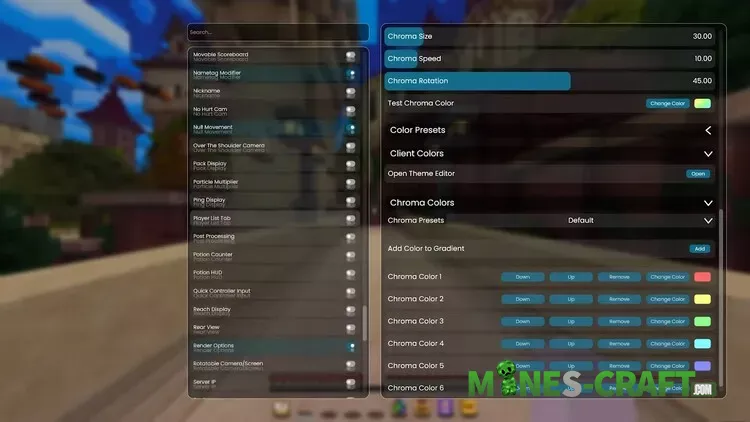
- From the screenshots, it’s clear that Onix gives you deep control over how the client looks. You can adjust text color, button color, scrollbar color, outlines and even background transparency. The client includes a full theme editor where you can create presets, add chroma or rainbow effects and fine-tune opacity levels.
- Onix includes a huge list of modules such as Armor HUD, Arrow Counter, Potion HUD, Ping Display and even unique tools like a Cape Manager, Chat Logger, Cinematic Camera and Combo Counter. Each module can be toggled, repositioned or customized, letting you build your own perfect UI.
- The global settings include FPS boosting features, V-Sync options, uncapped framerates and a new rendering engine. You can also enable module snapping, snap lines and adaptive positioning to make UI layouts cleaner.
- The client lets you create advanced chroma effects with size, speed and rotation controls. You can also build your own gradient using multiple colors and arrange them in any order-perfect for players who want their interface to stand out.
- Onix is often the first Bedrock client to support new game versions so you can update Minecraft without worrying about losing client compatibility.

Why Onix?
Unlike most free clients, Onix provides premium customization, high performance and a wide range of modules in one package. If you’re exploring different clients for Bedrock, Onix is a strong choice for both casual and competitive players who want more control over their game.
Common Questions
- Do I need Mumble running for it to work?
- Yes.
- Do I need the OnixClientMumbleLink running at all times?
- Yes. Keep it running while you play, or proximity chat won’t work.
- Where is my context?
- Your context is the string of letters and numbers near the bottom of the Proximity Chat module’s settings.
- What is a context?
- A context is what tells Mumble that you are in the same server as your friends.