OderSo Launcher (Client) [Bedrock/Windows]
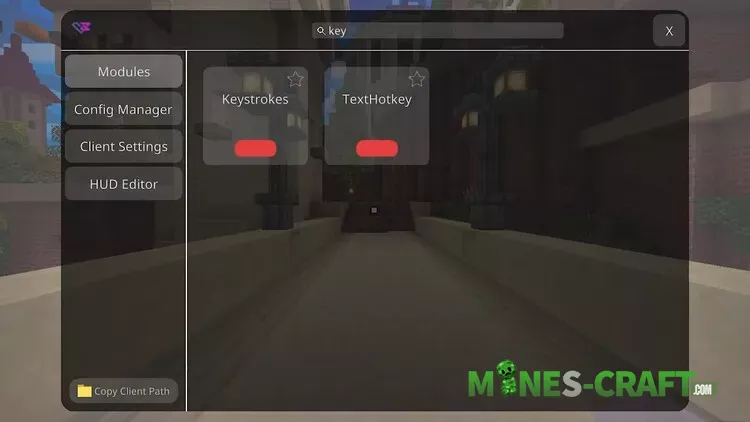
Today we are taking a look at one of the most popular Minecraft Bedrock clients designed for PvP and optimization. So the OderSo Launcher: from the screenshots you can see it comes with a modern interface and a clean menu with plenty of modules you can toggle on or off with just one click.

OderSo Features
Clean and User-Friendly Interface
The menu is divided into categories: Modules Config Manager Client Settings and HUD Editor. This makes it easy to customize the client exactly how you want.
PvP Modules
All the essentials for combat are here:
- Keystrokes – shows key presses
- CPS Counter – tracks clicks per second
- Combo Counter – monitors your hit streaks
- Armor HUD – displays armor durability
- Nametag – improves visibility of player names
- AutoSprint – lets you sprint without holding the key


Gameplay Enhancements
- LowFire and LowBob for a clearer view
- NoHurtcam – removes camera shake when hit
- NightMode – makes nights brighter and easier to play
- NoRender – disables unnecessary visuals for higher FPS
Utility and Stability Features
- AntiSpam – blocks chat spam
- MessageLogger – saves chat messages
- Minimap – adds a small map on screen
- FPS Counter – shows your frame rate in real time
As seen in the screenshots enabled modules turn green while disabled ones are red. You can also favorite your main features with the star button for quick access.

Players report getting stable 300-400 FPS which makes this client one of the best choices for PvP battles.
Changelog
OderSo Client – Update:
- Mods:
- Waypoints
- Added an option to change waypoint background colors.
- Waypoints can now be world-specific (option in settings, default is on).
- Added 3D waypoints (option in settings, default is 3D)
- Renamed .wp removeall command to .wp clear.
- DebugMenu
- Added toggles for specific categories of information.
- Added more detailed information about the held item.
- Added World ID information.
- Compass
- Is now moveable.
- Added an option to change compass color.
- WAILA
- Is now moveable.
- Screenshot
- Screenshots are now copied to the clipboard (optional setting).
- ArmorHUD
- Added enchant glint for XP bottles and enchanted golden apples.
- ShulkerPreview
- Added enchant glint for XP bottles and enchanted golden apples.
- SkinStealer: Fixed crash on Minecraft 1.21.11X.
- WAILA:
- Made font changeable.
- Now respects nametags with multiple lines.